A pending transaction has been broadcast to the Bitcoin network but does not yet have enough confirmations to be considered final. BlueWallet shows pending on-chain payments on the transaction status screen with a blue status card.
What you see
Open a pending transaction from your wallet’s transaction list. The header still shows the direction, Sent or Received, and when it was created.
The amount appears at the top (with a minus sign for sends). Below that, the blue Pending card tells you the payment is still in the mempool:
- Analyzing…: BlueWallet is estimating how long confirmation may take.
- Speed Up: available on some unconfirmed sent transactions. Replaces the transaction with a higher-fee version so miners are more likely to include it (RBF).
- Cancel: available when supported. Sends the funds back to your own wallet by spending the same inputs with a higher fee.
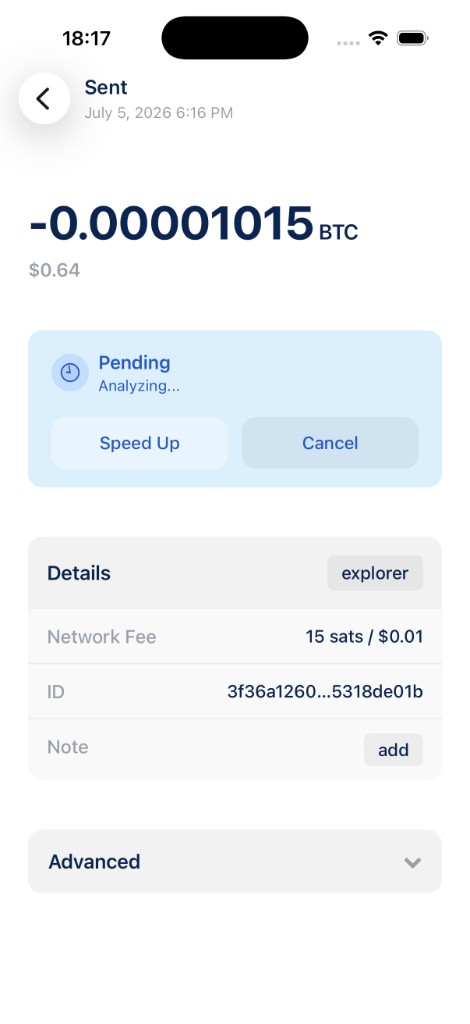
The Details section below works the same as for confirmed transactions. You can open the explorer link, check the Network Fee, copy the transaction ID, and add a Note.
When does pending clear?
Once the transaction is included in a block and gains confirmations, the status card changes:
- Sent turns red and shows the confirmation count.
- Received turns green and shows the confirmation count.
You do not need to do anything. BlueWallet refreshes the status automatically.
Tips
- Speed Up and Cancel only appear when the transaction supports Replace-By-Fee (RBF). If you do not see them, the send may confirm on its own or you may need to wait.
- A low fee can mean a longer wait during busy periods on the network.
- Pending received transactions do not show Speed Up or Cancel. Those actions apply to sends you initiated from this wallet.
- This guide is for on-chain Bitcoin wallets. Lightning payments confirm differently and use a separate detail screen.