A watch-only Chrome extension for Bitcoin you already hold. Add an address or an xpub / ypub / zpub and it keeps a live view of your balance, USD value, and market context. It cannot send, spend, or import private keys.
Chrome extension
BlueWallet Portfolio
Built for Bitcoin users. Stack sats and watch your portfolio grow. See live Bitcoin price moves, mempool state with next blocks, and current fee estimates.

Watch-only. Live price. Mempool view.
Watch your Bitcoin safely
Everything is watch-only. You can see balances and history-related metrics, but you cannot send, spend, or import private keys.
Addresses or xpubs
Add a Bitcoin address or an xpub / ypub / zpub to track funds as they move in.
Optional labels
Give each account a name, for example “Cold storage”, so the list stays readable.
Watch-only by design
See balances and history-related metrics. There is no way to send or import keys.
Remove anytime
Drop a watched account from your list whenever you no longer need it.
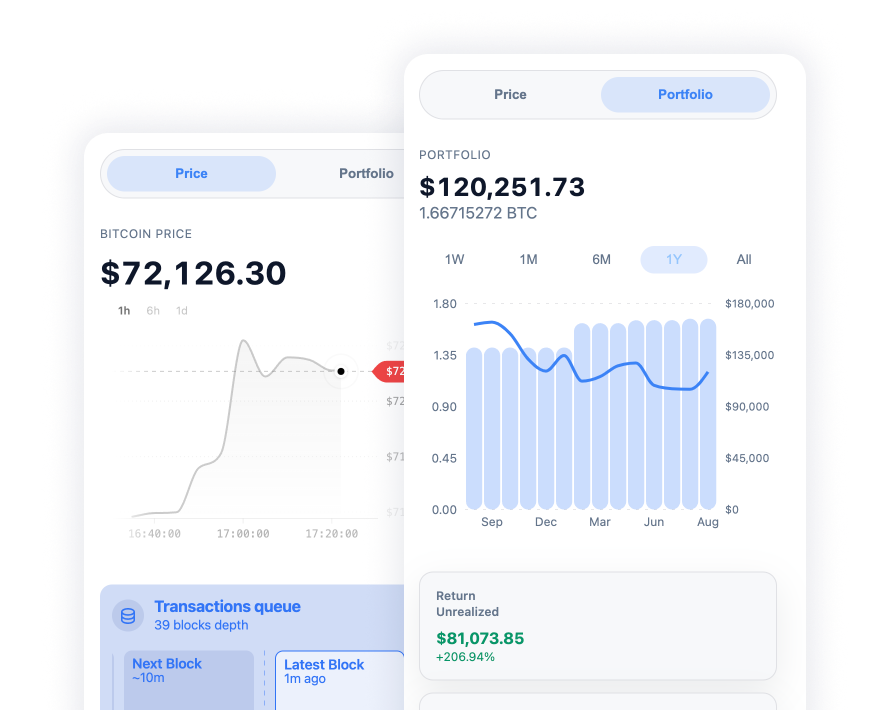
Portfolio at a glance
See your total value in USD, with your BTC balance right underneath.
Browse how holdings changed over 1 week, 1 month, 6 months, 1 year, or all.
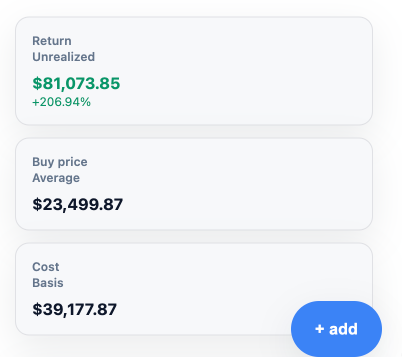
Review unrealized return, average buy price, and cost basis, based on when your confirmed coins first appeared.
Mempool and fees
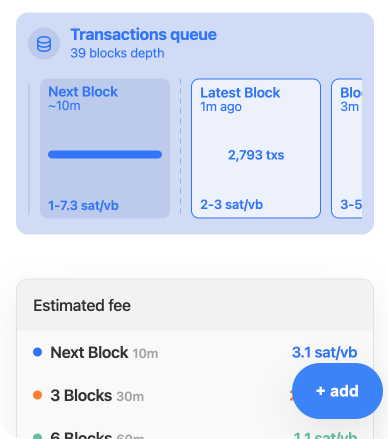
See mempool depth and the latest blocks as they come in.
Check estimated fees for the next block, ~30 minutes, or ~1 hour.
Follow the live BTC price in USD, with a chart for 1 hour, 6 hours, or 1 day.
Understand your coins
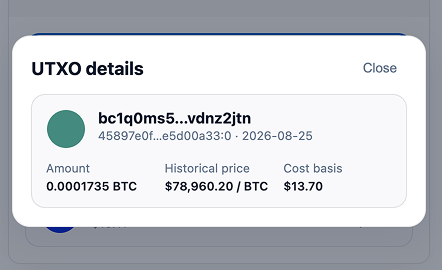
Open a UTXO breakdown of confirmed coins.
For each coin, see amount, current USD value, and cost basis.
Tap a coin for more detail, including when it showed up and the historical price used for cost basis.
Fits how you browse
Keep it beside the page you’re on, or open it full-width when you want more room.
Side panel
Opens from the toolbar so it stays beside whatever you’re already looking at.
Full-page view
More room when you want it. Price and portfolio sit side by side on wider screens.
Light or dark
Follows your system appearance automatically.
Remembers the tab
Comes back to Price or Portfolio, whichever you looked at last.
What it won’t do
By design. If you need to send, recover a wallet, or hold keys, use the BlueWallet app.
No sending or seeds
No sending, Lightning, or wallet recovery from seed phrases. Private keys never belong here.
USD only
Values are shown in US dollars. That’s the unit for price, portfolio, and cost basis.
Confirmed coins
Cost basis and the UTXO list track confirmed coins. Unconfirmed activity isn’t treated the same way.
Add it beside your tabs
Watch-only Bitcoin, in Chrome. No keys. No sending.
Frequently asked questions
Quick answers about the watch-only Chrome extension
-
What is BlueWallet Portfolio?
-
Do I need to enter a seed phrase or private key?
No. The extension is watch-only. You add a public Bitcoin address or an extended public key (xpub, ypub, or zpub). Seed phrases and private keys are not accepted, and there is no wallet recovery.
-
Can I send bitcoin from the extension?
No. There is no send, spend, or Lightning. To move coins, use BlueWallet or another wallet that holds the keys.
-
Should I add an address or an xpub?
Use an extended public key (xpub, ypub, or zpub) to watch a whole account as new coins arrive. Add a single address only when you want to track that one output. zpub is the usual pair for a Native SegWit wallet. You can copy an xpub from Wallet details in the BlueWallet app.
-
How are cost basis and unrealized return calculated?
From confirmed coins. Cost basis uses the historical USD price when each confirmed UTXO first appeared. Average buy price and unrealized return are derived from that. Unconfirmed activity is not included the same way.
-
Which browsers does it work in?
Chrome, as a toolbar extension. It opens as a side panel next to the page you’re on, or as a full-page view for more room. On wider screens, price and portfolio sit side by side. It follows your system light or dark appearance.
-
Is it safe to add an xpub?
An xpub cannot spend funds, but it reveals all addresses and balances for that account. Add it only in this watch-only extension or other wallets you trust to watch the funds, not to hold the keys. See also the notes on watch-only wallets.
Community
Be part, contribute as you can and stay up-to-date. Bitcoin is winning.
Contribute
Free Open Source Software
BlueWallet is free and open source software. Build in public by a community. And, one of the most used products in Bitcoin. Self-custody will win, but your contribution really matters. See how you can start contributing today.